This week, Canva turned heads by making Affinity—its popular alternative to Adobe’s creative suite—free for everyone, and the move quickly kicked up a frenzy among artists and designers. While some are celebrating the arrival of a new no-cost Photoshop alternative, others are approaching it with caution, wondering: What’s the catch here?
The App’s Big Upgrade (and Past Price Tag)
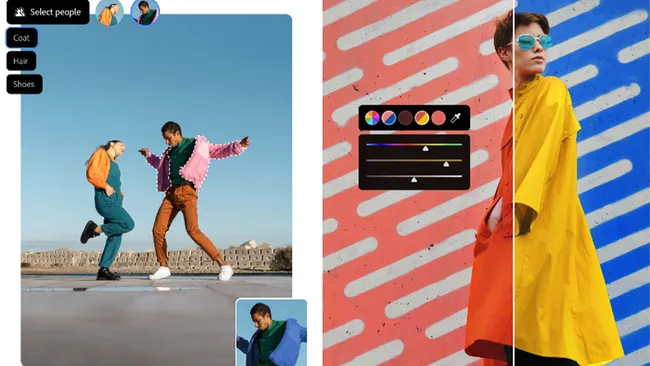
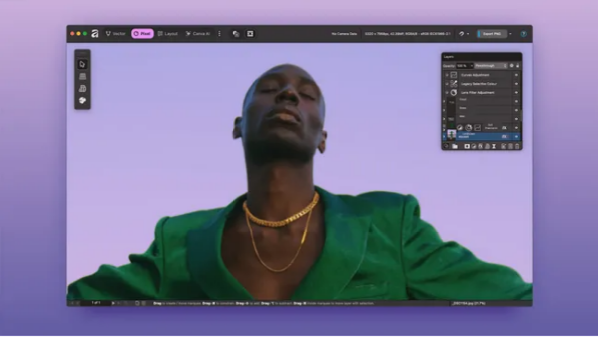
The new Affinity app wraps up the core tools from three previously separate programs: Affinity Photo, Affinity Designer, and Affinity Publisher. Not long ago, each of those three apps cost up to $70 apiece. Now, this desktop app combines their pixel-editing, vector-design, and layout tools into one place—completely free. It’s enough to make creatives ask: Is this an early Christmas gift, or something too good to be true?
Canva, the Australian-based design giant, acquired Serif (Affinity’s original developer) last year, but it left the brand untouched until October. That’s when Affinity’s website stopped selling its paid apps, sparking widespread speculation about what the company had in store.
The Hype: Why Creatives Are Excited
Now that Canva has relaunched Affinity as a free tool, many users are thrilled. On our Facebook post about the announcement, one commenter called it “the best news the creative community’s gotten in ages.” Others are stunned by how much they can do with free software now.
“I use Affinity as my stand-in for Photoshop, Illustrator, and InDesign,” one designer wrote. “Add ComfyUI and Krita for generative AI, free DaVinci Resolve for video, open-source Darktable as a Lightroom alternative, and Blender for 3D—and it’s wild that all these design tools are free.”
The Skepticism: What’s Worrying Users?
But there’s a key difference between free, open-source tools like Krita and Blender, and Canva—a for-profit company. That’s fueling natural distrust of big corporations, with users asking: What does Canva stand to gain here?
Theories are everywhere:
- Some think the app will eventually flood the app with ads, like many free mobile tools do.
- Others worry it will be used to train AI (a claim Canva has denied).
- A few even suspect Canva’s motive is to spite Adobe: “Their goal is to undercut Adobe, not support paying customers,” one user argued. “It’s revenge, not progress.”
Other fears center on Affinity’s future:
- “If your work depends on software, it needs regular updates to stay top-tier,” another designer noted. “Free tools rarely get that priority.”
- Many predict a shift to mandatory subscriptions: “They’ll lock you into their ecosystem with the ‘free’ version, then months later, the quality drops—and suddenly you have to pay to access your own projects.”
AI and the “Free” Debate: Philosophical Twists
AI has also become a flashpoint. The new Affinity app doesn’t have built-in generative AI, but Canva’s broader suite does—including its just-launched “Creative Operating System,” which it says uses the world’s first AI model made specifically for design. Premium Canva subscribers can access tools like Generative Fill directly in Affinity, suggesting the company is using Affinity as a “loss leader” to grow its user base, hoping some will upgrade for AI features.
This splits users:
- For some, the lack of AI makes Affinity a non-starter. “In the professional world, AI features are a must,” one said. “This just pushes Affinity toward subscriptions—and that won’t get Adobe users to switch.”
- Others like Canva’s approach: Let people pay for AI if they want it, while everyone else uses Affinity for free. But critics who oppose AI see hypocrisy: “If you hate AI, remember your entire design tool is funded by users who pay for it,” one commenter pointed out. “That’s a big issue for a lot of people.”
The debate has even turned philosophical: What does “free” really mean? Does signing up for a Canva account—handing over your name and email—count as a form of payment in its own right?
My First Impression: Smooth, But Not Perfect
I’ll admit I was one of the people looking for a catch, but after testing the new Affinity casually over the past day, my initial take is mostly positive. The app runs smoothly, and I found most of the tools I’d expect—masks, adjustment layers, retouching features, and more.
It’s surreal to edit a PDF, process raw photos, and create social media thumbnails all in the same app. Raw editing feels a bit clunky, and I’d miss Lightroom’s efficiency, but for tasks I’d normally use Photoshop for, Affinity holds its own.
Why Many Will Stick With Adobe (For Now)
Despite Affinity’s appeal, plenty of Adobe Creative Cloud users will stay put—and for good reason. First off, there’s Adobe’s Firefly AI tools; plus, Adobe tends to roll out updates more regularly. Just this week, for example, Adobe announced an AI assistant for Photoshop and personalized AI image generators for brands and artists.
Many creatives also need tools Affinity doesn’t offer: video editing (Adobe Premiere) and motion graphics (After Effects). But for those who only work with still graphics and don’t care about AI, Affinity might be all they need.
Where to Get Affinity
Affinity is available for Windows and Mac via its website. Canva has also confirmed an iPad version is in the works.